Botley 2.0: The Coding Robot
No app. No screen. No Bluetooth. You put in five AAA batteries and your child starts coding. Botley 2.0 is the best first coding robot for ages five to seven. It teaches sequencing, debugging and conditional logic without your child ever hearing those words.
Your child pressed every button on the TV remote, watched the garage door go up and down eleven times, and spent twenty minutes programming the microwave to beep in a pattern only they understood. You thought: there must be a toy that channels this. You typed "first coding toy" into a search bar and drowned in a sea of primary-coloured robots, all promising to teach your five-year-old to think like a software engineer. Botley 2.0, from Learning Resources, is the one that keeps appearing at the top of every list. It won Toy of the Year. Mumsnet parents recommend it constantly. Teachers use it in classrooms across the country. The question is whether it deserves all that, or whether it is just the default choice because nobody has thought of a better one.
It deserves most of it.
What It Is and What You Get
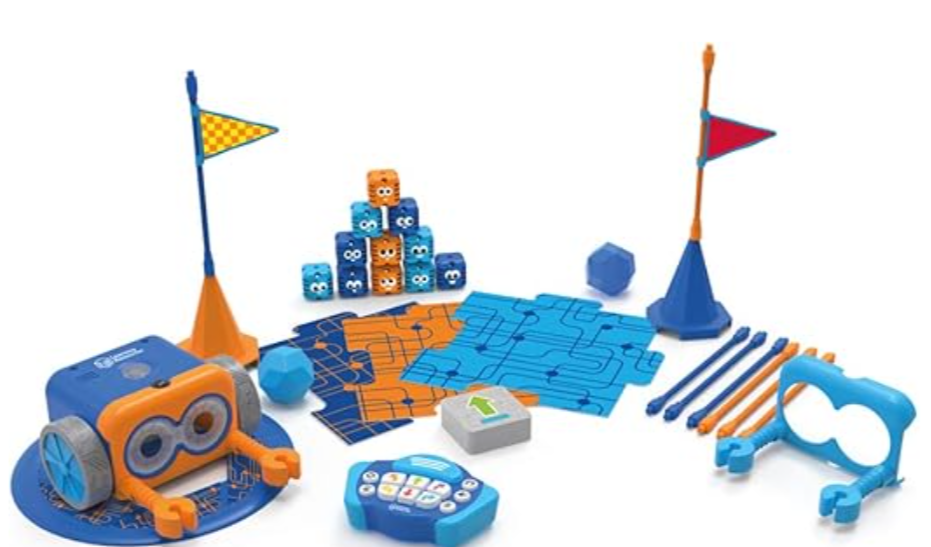
Botley 2.0 is a small, squat, blue robot about the size of a child's fist, with two wheels, light-up eyes, and a chunky handheld remote programmer. There is no app. There is no screen. There is no Bluetooth pairing, no Wi-Fi, no account creation, no software update. You put in five AAA batteries (three in Botley, two in the remote, none included), and your child starts coding.
The full Activity Set, which is the one to buy, costs around £55 to £65 on Amazon UK. It includes the robot, the remote programmer, two detachable face plates, 40 coding cards, six double-sided tiles, 27 obstacle building pieces, detachable robot arms, glow-in-the-dark stickers, and a starter guide with ten coding challenges. There is also a robot-only version for around £40 to £45, but it does not include the tiles or obstacles, which are what make the first few sessions actually work. Secondhand sets appear on eBay regularly for £25 to £35, though check that the remote is included and working.
What the First Session Actually Looks Like
You will need a Phillips screwdriver to open the battery compartments. That is the first thing nobody mentions. The screws are small and fiddly, and if you are opening this on Christmas morning without one, you will be dismantling a smoke detector. Have the screwdriver and the batteries ready before your child sees the box.
Once the batteries are in, you switch Botley on, and the whole thing takes about ninety seconds before your child is pressing buttons. The remote has six directional arrows (forward, back, left 45 degrees, right 45 degrees, left 90 degrees, right 90 degrees), a big blue transmit button, and a delete button. Your child presses a sequence of arrows, hits transmit, and Botley executes the sequence on the floor. That is it. That is coding.
The first session, realistically, is fifteen to twenty minutes of your child pressing forward three times and watching Botley drive into a table leg, then laughing, then trying again. A parent needs to be present for this first session to explain the cards, lay out the tiles, and show how the remote works. A five-year-old will not read the manual. A six-year-old might glance at it. Either way, plan to sit on the floor for the first go. If you are not confident with technology yourself, that is fine. There is nothing here that requires technical knowledge, and our guide for non-technical parents covers exactly what to expect.
What It Is Genuinely Good At
Botley teaches sequencing, debugging, and conditional logic without your child ever hearing those words. A child who spends thirty minutes trying to get Botley around a cone, through a gap, and back to the starting tile has just written a program, tested it, found a bug (Botley turned left instead of right), deleted the last step, corrected it, and re-run the code. That is a complete debugging cycle, and the child thinks they are playing with a toy car.
The coding cards are quietly brilliant. They are physical cards with arrows and symbols that your child lays out in a row on the floor before entering the sequence into the remote. For a five-year-old who cannot yet hold a sequence in their head, being able to see the whole program laid out in front of them is the difference between frustration and understanding. It is the same principle as writing pseudo-code before you write real code, except it involves laying laminated cards on a kitchen floor.
The object detection feature introduces If/Then logic. You programme Botley to walk forward, and if it detects an obstacle, it executes a different set of commands. A child who gets this working has understood conditional statements. They do not know they have understood conditional statements. They think they taught a robot to dodge a cone. That is exactly how it should work.
The 16 secret codes are the part children talk about at school. Enter a specific button combination and Botley transforms into a ghost, a dinosaur, a police car, a shark. The codes are in the activity guide, and children treat them like cheat codes in a video game. The educational value here is minimal, but the engagement value is enormous. A child who has spent ten minutes on a frustrating sequencing challenge will spend another ten because they want to unlock the next secret code.
Botley is also extremely sturdy. It survives being dropped from table height, kicked across a room, and used as a bath toy by a younger sibling (not recommended, but it lived). The remote feels solid in small hands. The buttons are chunky and colour-coded. Nothing about this product feels cheap.
The line-following mode, where Botley tracks a black line printed on the included tiles, is less satisfying than the coding mode. The tiles are small, the lines are short, and the novelty wears off quickly. If your child is genuinely interested in line-following as a concept, our separate guide to building a line-following robot from scratch is a better use of their time, and it works with kits they may already own.
Before You Open the Box
The battery situation is annoying. Five AAA batteries, not included, with screw-secured compartments that require a Phillips screwdriver. Botley gets through batteries at a reasonable rate, around six to eight hours of active play before you notice it slowing down, but if your child uses it regularly you will want to invest in rechargeable AAAs. It is odd that Learning Resources did not build in a rechargeable battery given the price point, but the upside is that when the batteries die you swap them in two minutes rather than waiting for a charge cycle.
The remote programmer communicates with Botley via infrared, not Bluetooth. This means your child needs to point the remote roughly at Botley and be within about a metre when they hit transmit. In practice, this works fine in a well-lit room, but bright sunlight or certain overhead lighting can interfere with the signal. If your child is sitting across the room pressing transmit and nothing happens, move closer. One parent review reported that Duracell batteries specifically caused connection problems because they sat slightly shorter in the compartment. If the remote is not transmitting, try a different battery brand before assuming it is broken.
There is a ceiling to what Botley can do, and your child will find it. Botley supports up to 150 steps in a sequence, which is generous for the age range, but there is no way to save programs, no way to name them, and no way to build on previous work. Every session starts fresh. For a five or six-year-old, this does not matter. For an eight-year-old who has been using Botley for a year, it starts to feel limiting. There is no progression path to Scratch, no app-based extension, no way to connect Botley to a computer. When your child outgrows Botley, they move on to a completely different product. That is not a flaw so much as a design choice, but it means Botley is a first chapter, not a whole book.
The obstacle pieces are fine but not abundant. After a few sessions your child will start raiding the house for additional obstacles: Duplo bricks, books, shoes, the cat. This is actually a good sign. It means they have moved from following the guided challenges to designing their own, which is where the real learning happens.
The line-following mode, where Botley tracks a black line printed on the included tiles, is less satisfying than the coding mode. The tiles are small, the lines are short, and the novelty wears off quickly. You can draw your own lines with a thick black marker on large paper, which extends this feature considerably, but out of the box it feels like an afterthought.
The Verdict
Botley 2.0 is the best first coding robot for children aged five to seven. The sweet spot is a child who is five or six, curious about how things work, and not yet reading confidently enough for app-based coding. If that is your child, and you want something that teaches real programming concepts without a screen, without an app, and without you needing to understand anything about coding yourself, this is the one to buy.
For a child who is already seven or eight and has used Scratch at school, Botley will feel too simple within a month. They need something with a longer growth path: the Makeblock mBot2 if they want to build and code, or the Sphero BOLT if they want app-based challenges with more depth.
For a child who is four, Botley works, but only with a parent sitting beside them for every session. The remote buttons are easy to press, and a four-year-old can understand "press forward three times and hit the blue button." But the obstacle courses, the conditional logic, and the secret codes will go over their head. You are paying £55 for a remote-controlled car with extra steps. The Code & Go Robot Mouse, which we have reviewed separately, is a better fit at that age and a lower price.
For the parent who is already thinking about the money: £55 for the Activity Set is fair. It is less than a LEGO set that takes an afternoon and then sits on a shelf. It is less than three months of most subscription boxes. The toy has no ongoing costs beyond batteries, no subscription, no in-app purchases, and no software that might be discontinued (if you want to see what that risk looks like in practice, read our SPIKE Prime review). Your child will use it actively for six months to a year, and it will still be working when you pass it on to a younger cousin or donate it to a school. For what it teaches in that window, the price is justified.
If your child likes making things move and wants to be the one deciding where they go, Botley is a very good place to start. If your child wants something that talks back, has a personality, and feels like a companion, look at the Eilik or the Miko 3 instead. Botley is a tool, not a pet. The right child will not care about the difference.